Matplotlib Customization with National Park Visitation Data (Solution)

matplotlib
advanced
solution
Published

February 26, 2024

Solution

Matplotlib Customization with National Park Visitation Data

Exercise Without Solutions

These exercises use National Park visitation data from 1979–2024. For more context about the dataset, see the data essay.

Concepts covered:

  • Filtering data for a specific category
  • Line plots with custom colors and titles
  • Customizing x-axis tick intervals
  • Abbreviating y-axis labels (millions, thousands)
  • Adjusting axis limits to zoom into a time period

Load National Park Visitation data

Code
import pandas as pd
import matplotlib.pyplot as plt
import matplotlib.ticker as ticker

np_data = pd.read_csv("https://raw.githubusercontent.com/melaniewalsh/responsible-datasets-in-context/main/datasets/national-parks/US-National-Parks_RecreationVisits_1979-2024.csv")
np_data.head()
ParkName Region State Year RecreationVisits
0 Acadia NP Northeast ME 1979 2787366
1 Acadia NP Northeast ME 1980 2779666
2 Acadia NP Northeast ME 1981 2997972
3 Acadia NP Northeast ME 1982 3572114
4 Acadia NP Northeast ME 1983 4124639
  • How have visits to a particular National Park changed over time?
  • What is the most interesting period of change?

Exercise 1

First, filter the dataframe for a park of your choice. Pick a National Park that you haven’t worked with yet, and filter the data for only that park.
Code
my_parks_df = np_data[np_data['ParkName'] == 'Mount Rainier NP']

my_parks_df.head()
ParkName Region State Year RecreationVisits
1913 Mount Rainier NP Pacific West WA 1979 1516703
1914 Mount Rainier NP Pacific West WA 1980 1268256
1915 Mount Rainier NP Pacific West WA 1981 1233671
1916 Mount Rainier NP Pacific West WA 1982 1007300
1917 Mount Rainier NP Pacific West WA 1983 1106306

Exercise 2

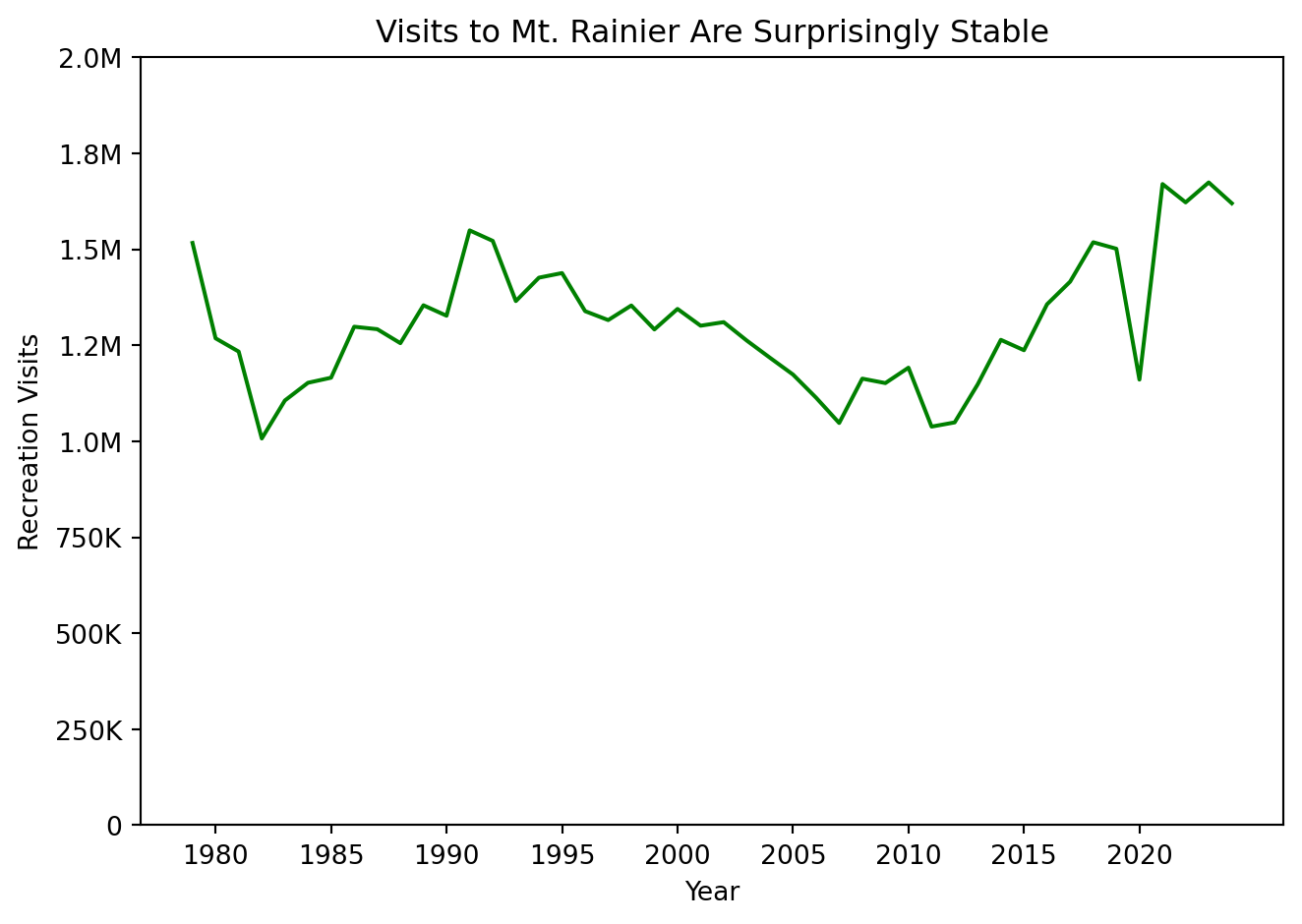
Now, make a line plot that shows the number of visits per year to that park from 1979 to 2022.

2a.

Choose a color for the line.

2b.

Give the plot a title that also functions as a kind of “headline” for the most interesting story of the plot.

2c.

Change the x-axis ticks so that they increase 5 years at a time.

2d.

Change the y-axis tick labels so that they abbreviate millions to M and thousands to K.

Code
def abbreviate_number(x, pos):
    if x >= 1_000_000:
        return f'{x/1_000_000:.1f}M'
    elif x >= 1_000:
        return f'{x/1_000:.0f}K'
    return str(int(x))

fig, ax = plt.subplots()

ax.plot(my_parks_df['Year'], my_parks_df['RecreationVisits'], color='green')
ax.set_xticks(range(1980, 2025, 5))
ax.yaxis.set_major_formatter(ticker.FuncFormatter(abbreviate_number))
ax.set_ylim(0, 2_000_000)
ax.set_title('Visits to Mt. Rainier Are Surprisingly Stable')
ax.set_xlabel('Year')
ax.set_ylabel('Recreation Visits')

plt.tight_layout()
plt.show()

Exercise 3

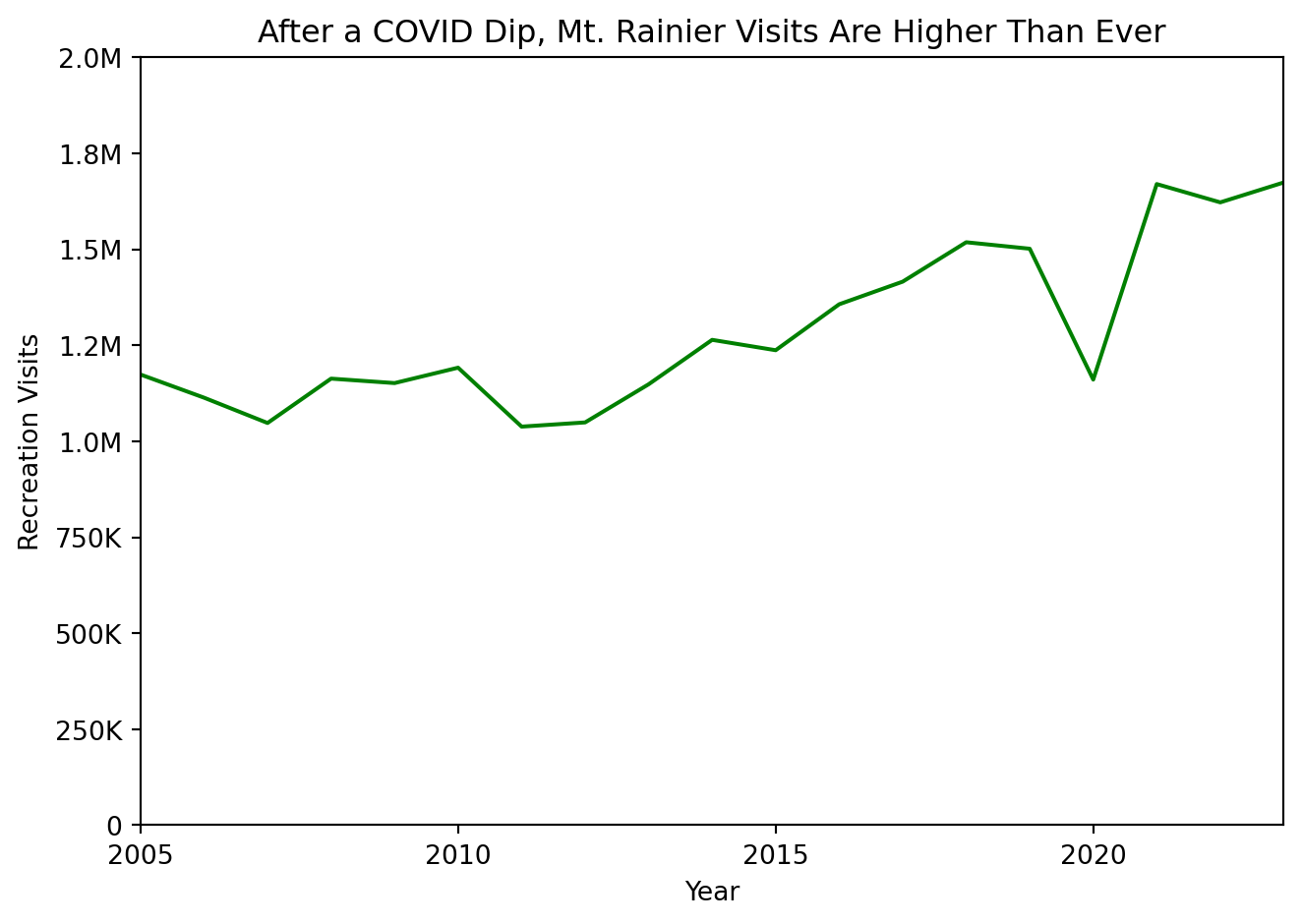
Now, create a plot that zooms in on the most interesting time period for this particular National Park.

3a.

Change the x-axis limits so that it only shows the most interesting years.

3b.

Come up with a new title that describes this time period.

Code
fig, ax = plt.subplots()

ax.plot(my_parks_df['Year'], my_parks_df['RecreationVisits'], color='green')
ax.set_xticks(range(1980, 2025, 5))
ax.set_xlim(2005, 2023)
ax.yaxis.set_major_formatter(ticker.FuncFormatter(abbreviate_number))
ax.set_ylim(0, 2_000_000)
ax.set_title('After a COVID Dip, Mt. Rainier Visits Are Higher Than Ever')
ax.set_xlabel('Year')
ax.set_ylabel('Recreation Visits')

plt.tight_layout()
plt.show()